

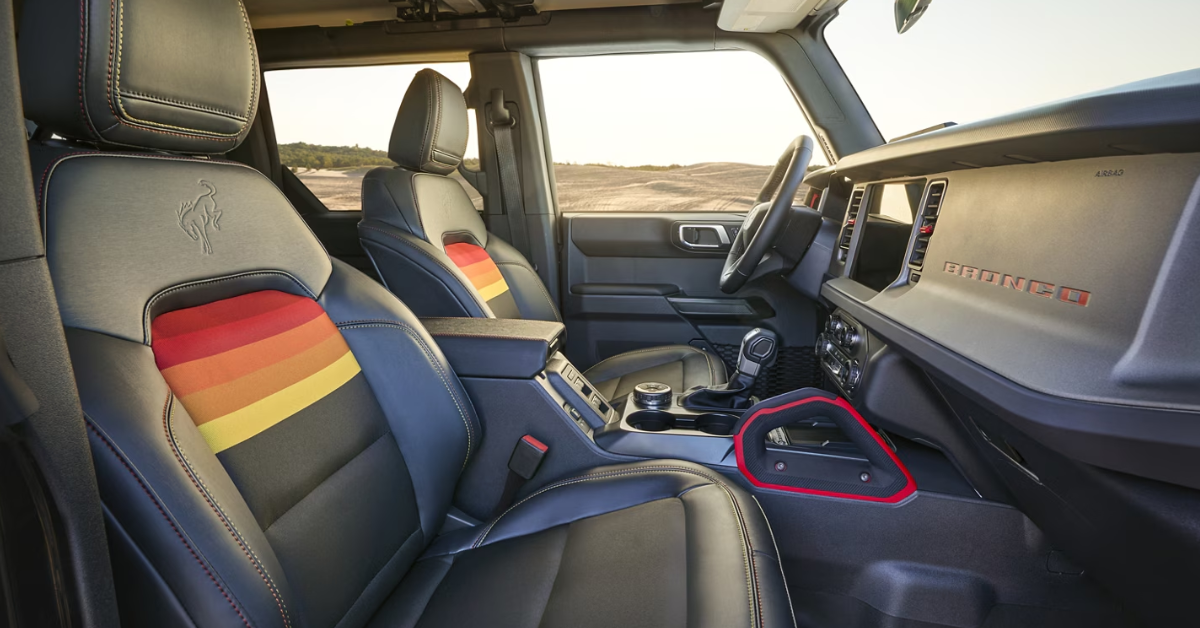
When it comes to driving comfort, Ford’s Memory Seating system is a game-changer. Whether you’re behind the wheel of a rugged F-150, an adventurous Bronco, or a family-friendly Explorer, this innovative feature makes your daily drive more personalized and convenient. Ford’s Memory Seating allows you to save and recall your ideal seat position with just a push of a button, making it a must-have for drivers who share their vehicles or simply want a more comfortable ride. In this step-by-step guide, we’ll walk you through how to use Ford’s Memory Seating system in 2025—whether you’re programming your seat for the first time or troubleshooting an issue. Ready to experience the convenience for yourself? Visit Diamond Ford today, or reach out to us if you have any questions!
Step-by-Step Guide to Setting Up Ford’s Memory Seating
1. Adjust Your Seat for Comfort
Before you can save your seat position, make sure you’re in the perfect driving position.
- Adjust the seat height: Raise or lower the seat so your feet can reach the pedals comfortably.
- Set the seatback angle: Lean back to your ideal position.
- Fine-tune lumbar support: Adjust the lumbar support to provide back comfort.
- Steering wheel adjustments: If your model has power steering adjustments, don’t forget to set the wheel where you like it.
- Adjust mirrors (if applicable): Some Ford models also allow you to save mirror settings with memory seating.
Take your time to find the position that feels just right. This will be your base setting.
2. Locate the Memory Seat Button
Ford’s Memory Seating buttons are usually found on the side of the driver’s seat or on the door panel. These buttons are often labeled with numbers, typically 1 and 2. If your vehicle offers more memory slots, you may see additional numbers.
3. Save Your Seat Position
Once you’ve adjusted everything to your liking, it’s time to save your settings.
- Press and hold the memory button: Select the button you’d like to store your position under (1, 2, etc.). Hold the button down for about 5 seconds.
- Listen for the confirmation beep: After a few seconds, you’ll hear a beep, letting you know your seat position has been saved.
That’s it! Your seat is now saved under that specific number, and you can recall it at any time.
4. Program Additional Drivers (If Applicable)
If multiple people drive the same vehicle, you can save a different seat position for each driver. To do this:
- Have the second driver adjust the seat to their preferred position.
- Repeat the same steps: press and hold the next memory button (usually 2) for 5 seconds.
- The second position will now be saved.
If your vehicle has more than two memory buttons, you can repeat this for additional drivers.
5. Test the Memory Settings
Once you’ve saved the settings, try out the system to make sure it works.
- Exit the vehicle: Walk away and then return.
- Use the memory button or key fob: Press the corresponding button to see if the seat moves to your saved position.
- If your vehicle has key fob integration, the seat may even adjust automatically when you unlock the car.
By following these simple steps, you can easily set up your Ford’s memory seating system. Whether you drive a rugged truck like the F-150 or an SUV like the Explorer, it’s a quick and effortless way to ensure the perfect seating position every time.
Key Features and Benefits of Ford’s Memory Seating System
Key Features of Ford’s Memory Seating
Ford’s Memory Seating system makes it easy to save and recall your seat position with just a button press. Here are the main features:
- Multiple Seat Adjustments: Save settings for seat height, backrest angle, lumbar support, and steering wheel.
- Memory Buttons: Buttons on the seat or door panel (usually 1 and 2) store different seat positions for multiple drivers.
- Automatic Recall: If your vehicle has key fob integration, your seat settings adjust automatically when you unlock the car.
- User Profiles: Some models, like the Explorer, can store mirrors and other personal settings.
Benefits of Ford’s Memory Seating
- Convenience: Perfect for families or shared vehicles—each driver can store their preferred settings.
- Time-Saving: No more manual seat adjustments—your seat is always ready for you.
- Comfort: Always sit in your ideal position for better comfort on long drives.
- Safety: Correct seat positioning helps with better control and visibility on the road.
Ford’s Memory Seating is all about making your driving experience more personal, comfortable, and convenient, whether you’re in the Explorer, F-150, or any other Ford model.
Additional Features of Ford’s Memory Seating
Ford’s Memory Seating system in 2025 goes beyond just saving and recalling seat positions. This feature has become even more advanced and user-friendly, offering a range of additional benefits. Whether you’re driving a Bronco or another Ford model, you’ll appreciate these added capabilities that enhance convenience and personalization.
Programming Seat Recall for Multiple Users
In the 2025 Ford lineup, you can now easily program seat recall settings for multiple drivers. This means that each driver can store their unique preferences, and the system will automatically adjust the seat to their saved position when they enter the vehicle.
- Multiple settings: Save and recall settings for up to two or more drivers.
- Key fob integration: Each key fob can be linked to a specific driver, allowing the vehicle to recognize who’s entering and adjust the seat automatically.
- Personalized comfort: This ensures that each driver always has their seat in the right position without needing to adjust it manually.
Advanced Mirror and Steering Wheel Adjustments
In some Ford models, such as the Bronco, the memory system doesn’t just apply to the seat. It can also store mirror and steering wheel settings, making your driving experience even more personalized.
- Memory mirrors: If your vehicle has power-adjustable mirrors, these settings can also be saved and recalled, making it easier to drive.
- Steering wheel position: For added comfort, you can store your preferred steering wheel height and distance, so you’re always driving in the most comfortable position.
Seamless Integration with Ford SYNC
Ford’s SYNC technology enhances the memory seating system by integrating it with your vehicle’s digital settings. This integration offers more control and customization over your vehicle’s features.
- SYNC connection: Use your SYNC system to view and adjust seat, mirror, and steering wheel settings.
- Voice commands: In some models, you can recall seat positions using simple voice commands via SYNC.
New for 2025: Customizable Seat Features
For 2025, Ford has made additional changes that further improve the seat memory feature. These include more precise adjustments for seat heating, ventilation, and lumbar support, which can now be stored and recalled.
- Heated and ventilated seats: Save your preferred temperature settings, so the seat adjusts automatically to your comfort level.
- Advanced lumbar support: Program the exact amount of lumbar support you prefer for every drive.
Additional Features of Ford’s Memory Seating in 2025
Programming Seat Recall and More
Ford’s Memory Seating system in 2025 offers even more features to make your driving experience easier and more personalized.
- Multiple Drivers: Save different seat settings for each driver and recall them using your key fob.
- Mirror & Steering Wheel Settings: In some models, like the Bronco, you can also save mirror and steering wheel positions.
- SYNC Integration: Control your seat, mirror, and steering wheel settings through the SYNC system for added convenience.
New for 2025: Customizable Comfort
Ford now allows you to save seat heating, ventilation, and lumbar support settings, giving you even more control over your comfort.
- Heated & Ventilated Seats: Save your preferred seat temperature for each drive.
- Lumbar Support: Adjust and save the exact level of lumbar support you prefer.
These advanced features ensure your vehicle feels just right every time you get behind the wheel.
Why Ford’s Memory Seating is Essential
Ford’s Memory Seating system isn’t just a nice extra—it’s a game-changer for drivers. Whether you’re behind the wheel of a versatile Explorer or another Ford model, this feature provides real convenience and comfort. Here’s why it’s so essential for everyday driving.
Perfect Comfort Every Time
With Ford’s memory seats, you can always enjoy the perfect seat position without wasting time adjusting it. Once you set up your seat, it’s easy to get back to that same comfortable spot.
- No more adjustments: Simply press the memory button to recall your saved seat position. It’s that easy.
- Customized for you: Whether you like your seat high, low, forward, or back, you can adjust everything to suit you.
Convenience for Multiple Drivers
If multiple people drive your vehicle, Ford’s memory seats save everyone’s unique settings. This means no more arguments about seat positions!
- Multiple settings: Store different seat positions for up to two or more drivers.
- Key fob integration: The system can recognize which driver is entering and adjust the seat automatically.
Saves Time and Effort
Instead of adjusting the seat every time you get in the car, Ford’s memory seating does the work for you. Whether you’re heading to work or a weekend trip, you can focus on the road and not your seat.
- Quick and simple: Press a button, and your seat is ready.
- No need to reset: Every time you drive, your saved settings are just a button press away.
Improved Safety and Control
Having the seat in the right position doesn’t just make you comfortable—it also improves your control and safety on the road. When you’re in the correct seat position, you have better visibility and control of the vehicle.
- Optimal visibility: Being in the right seat height gives you a better view of the road and surroundings.
- Better control: A properly adjusted seat ensures you can reach the steering wheel and pedals comfortably.
Enhanced Driving Experience
Ford’s memory seating system isn’t just about comfort; it’s about making your overall driving experience better. The ease of use, automatic adjustments, and time-saving features all contribute to a smoother ride.
- Automatic adjustments: For models like the Explorer, the system can even store and adjust mirror settings for added comfort.
- Personalized: From seat settings to mirrors, everything is adjusted to your preferences, making each trip more enjoyable.
Ford’s memory seating isn’t just a feature—it’s a necessity for modern drivers who value comfort, convenience, and safety. Whether you’re driving across town or across the country, this system helps make every drive feel just right.
Maintaining Your Ford’s Memory Seating System for Longevity
Ford’s memory seating system is designed to last. However, like any feature, regular maintenance can help ensure it continues working smoothly for years. Follow these simple tips to keep your seat position memory system in great shape, whether you’re driving a Bronco or another model.
1. Keep Your Vehicle’s Electrical System in Check
The memory seating system relies on your vehicle’s electrical system. A healthy electrical system ensures smooth performance.
- Regularly check the battery: A weak battery can affect the memory system’s functionality.
- Ensure proper wiring: Check that no wires or connections related to the seat motors are damaged or exposed.
2. Reprogram Seat Recall Settings as Needed
If you notice that your seat isn’t recalling the correct settings, it might be time to reprogram your memory system.
- Clear and reset settings: If the seat position recall isn’t working correctly, clear the settings and follow the programming steps.
- Save new positions: After reprogramming, save your seat settings again to ensure they are stored properly.
3. Regularly Clean the Seat Tracks
Dirt and debris can build up in the tracks where your seat moves, causing it to move slowly or unevenly. Keep them clean for smooth operation.
- Use a soft cloth: Wipe down the seat tracks to remove dust and grime.
- Vacuum the area: Use a vacuum to get into the tight spaces and clear out any small debris.
4. Inspect Seat Motors and Adjustments
The motors that control the seat adjustments can wear out over time. Keeping them in good condition will help the memory seating system last longer.
- Listen for unusual noises: If you hear grinding or strange noises when adjusting the seat, the motor may need attention.
- Lubricate the seat tracks: Apply a small amount of lubricant to the tracks to keep the seat moving smoothly.
5. Keep Your Key Fob in Good Condition
The memory seating system often works in conjunction with your key fob. If your key fob is damaged or has a weak battery, it may not trigger the seat recall feature properly.
- Replace the battery: Change your key fob battery regularly to ensure it communicates with the vehicle.
- Check for damage: Inspect the fob for cracks or other signs of wear that might prevent it from working properly.
6. Stay on Top of Regular Maintenance
Routine maintenance is key to keeping all your Ford features in top shape. Regular service appointments will help spot any issues before they become bigger problems.
- Follow the manufacturer’s maintenance schedule: Bring your Ford in for regular check-ups as outlined in the owner’s manual.
- Ask for memory seating checks: During service, request that the memory seating system is checked to ensure everything is working properly.
Which Ford models in 2025 offer memory seating features?
In 2025, Ford’s memory seating feature is available in several models, including the F-150, Explorer, Maverick, and Bronco. These vehicles come equipped with the system, allowing drivers to save their seat positions for quick and easy adjustments.
How do I program and save seat positions, and can multiple drivers set different profiles?
To program and save seat positions, simply adjust your seat to the desired position, then press and hold the memory button on the side of the seat (typically labeled “1” or “2”) for about 5 seconds until the system confirms the setting. Multiple drivers can set their own profiles by saving different positions under different buttons. Each driver can program their own settings, ensuring a personalized experience for everyone.
Does memory seating also adjust mirrors and steering wheel?
Yes, in many 2025 Ford models, the memory seating feature can also adjust the mirrors and steering wheel positions. If your vehicle supports these features, your seat, mirror, and steering wheel settings can be saved and recalled together, providing a fully customized driving position.
Can the memory function be linked to a key fob for automatic seat recall?
Yes, Ford’s memory seating function can be linked to your key fob. This means that when you unlock your vehicle with your key fob, the system will automatically adjust the seat (and, in some cases, the mirrors and steering wheel) to the saved position associated with that key fob.
Explore Advanced Tech & Innovation at Diamond Ford in Lancaster
Now that you know how to make the most of Ford’s memory seating system, why not explore the other exciting features Ford has to offer? Whether you’re in Lancaster, Palmdale, Antelope Valley, or Mojave, Diamond Ford is ready to help you find the perfect vehicle.
Visit us today to browse our wide selection of models, including the F-150, Explorer, Maverick, and Bronco. If you’re looking for a vehicle that suits your needs and makes every drive more comfortable, we have something for you.
While you’re here, don’t forget to check out other helpful guides like Why Ford is Discontinuing the Escape After 2025, or if you’re interested in exploring Ford’s off-road capabilities, learn the difference between Ford’s FX4 vs 4X4 in our detailed comparison. If towing is important to you, our article on Ford’s towing capacities can help you make the right choice.
Ready to dive deeper? We’re here to help with all your questions. Visit our site or stop by to learn more about Ford’s advanced features and find the right vehicle for your lifestyle.
Get Directions to Diamond Ford
Disclaimer: All information is provided for general informational and entertainment purposes only. While we strive for accuracy, we cannot guarantee that all content is complete, current, or error-free. Any reliance you place on such information is strictly at your own risk. This article may include opinions and is not endorsed by, or officially affiliated with, any vehicle manufacturer or brand. Always consult official sources – such as the vehicle’s owner’s manual, authorized dealerships, or certified professionals – for the most up-to-date and personalized information.
Connect with us


Warning: Operating, servicing and maintaining a passenger vehicle or off-road vehicle can expose you to chemicals including engine exhaust, carbon monoxide, phthalates, and lead, which are known to the State of California to cause cancer and birth defects or other reproductive harm. To minimize exposure, avoid breathing exhaust, do not idle the engine except as necessary, service your vehicle in a well-ventilated area and wear gloves or wash your hands frequently when servicing your vehicle. For more information go to www.p65warnings.ca.gov/passenger-vehicle.